Meta ads are still the backbone of most Kickstarter marketing budgets, but running them well in 2026 takes more setup than it used to: a pixel that has to live off Kickstarter's own page, a Conversions API connection, and a phase structure that changes what you're optimizing for every few weeks. This guide is the technical setup and phase-by-phase structure - for the creative and messaging playbook, read Facebook ads for Kickstarter alongside this one. If you'd rather have a team build and run this for you, talk with BoostYourCampaign.
Kickstarter Meta ads run in three phases: pre-launch lead generation to a landing page, a launch-window push that converts warm leads into backers, and live-campaign retargeting and scaling once the project is public. Because Kickstarter's project page will not accept a Meta Pixel or Conversions API code, tracking has to happen on a landing page you control before traffic reaches Kickstarter. Pre-launch testing typically runs at $20 a day per ad set for 3-4 days before you kill or scale it, and once live, the highest-value audience to retarget is leads who signed up but have not pledged yet.
- Three phases, three jobs - pre-launch builds the list, the launch window converts it, live retargeting scales what's working.
- The pixel goes on your landing page, not Kickstarter - Kickstarter's page can't carry tracking code, so a landing page isn't optional.
- Test at $20/day per ad set for 3-4 days - enough signal to kill or scale without burning budget on noise.
- CPL is your health check - a rising cost per lead as you spend more means the offer or creative is fading.
- Retarget leads who didn't pledge first - it's the warmest, cheapest audience once the campaign goes live.
- Front-load the first and last 48-72 hours - that's when momentum and urgency do the most work for your ad dollars.
1) The three phases of a Kickstarter Meta ads campaign
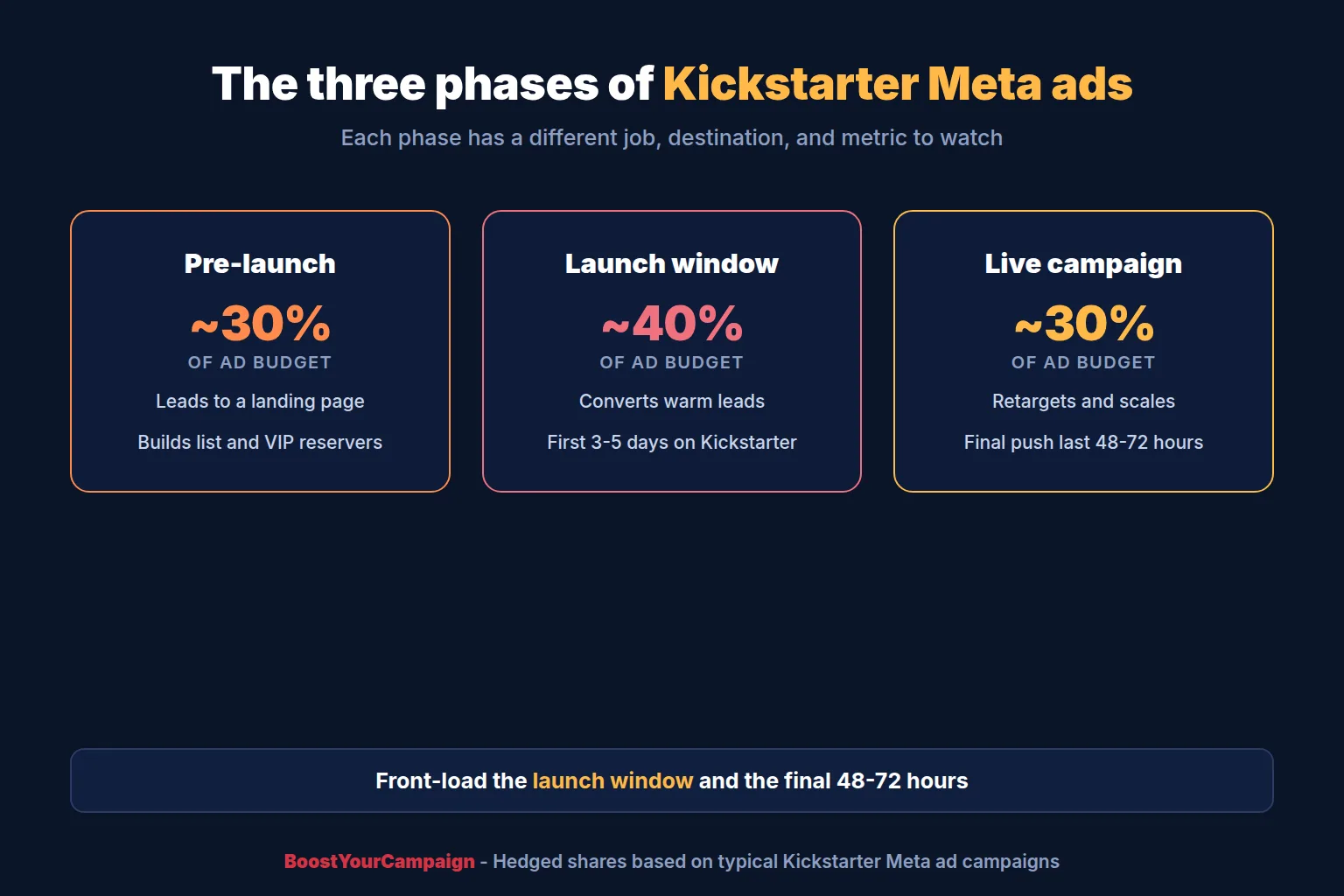
Kickstarter Meta ads are not one campaign, they're three, each with a different objective, destination, and way of measuring success.
Pre-launch is lead generation. Ads run to a landing page, not Kickstarter, and the job is building an email list and a group of $1 VIP reservers before the campaign is public. This phase usually runs several weeks to a couple of months before launch and, in our experience, takes up roughly a quarter to a third of the total ad budget.
The launch window is the first 3-5 days after the campaign goes live. Ads switch from lead generation to conversion: you're sending your warmest audience, the pre-launch leads, straight at a pledge decision. This window often absorbs the largest single share of budget, commonly around 40%, because early velocity compounds - campaigns leaning on a strong pre-launch list often see close to 90% of their first-48-hour backers come from that list, and the target is 100% of the funding goal on day one, which is what the campaigns BoostYourCampaign runs usually reach; our Kickstarter benchmarks guide breaks those numbers down further.
Live-campaign retargeting and scaling covers the rest, typically two to four weeks: warm retargeting audiences plus continued cold prospecting through lookalikes, with a second push in the final 48-72 hours. If you're also running Google ads or TikTok ads, budget shares shift, but Meta usually carries the bulk. See the table below for goal, destination, audience, creative, and budget share by phase, and our broader Kickstarter ads guide for wider strategy.
2) Tracking setup before you spend a dollar
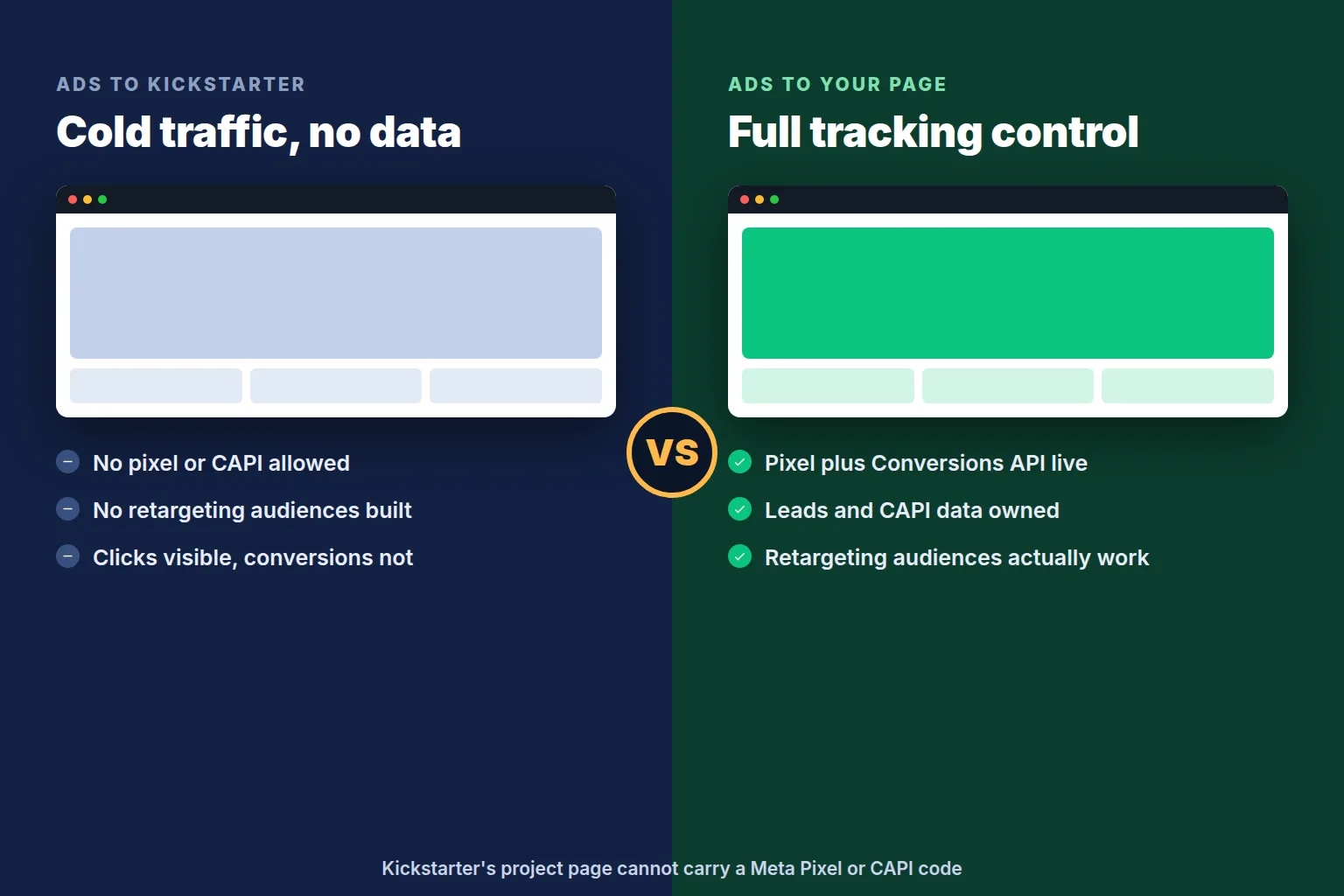
Before any kickstarter facebook ads setup work starts, get tracking right - you cannot fix attribution after the fact. Install the Meta Pixel and Conversions API (CAPI) on your pre-launch landing page - see our pre-launch landing page guide for how to build it. The Pixel alone is fragile: tracking prevention and ad blockers quietly drop events, so CAPI, which sends conversions server-side, keeps your reported cost per lead honest as privacy changes erode client-side tracking.
Here's what surprises first-time creators: Kickstarter will not let you add a Meta Pixel or any tracking script to your project page. Cold traffic sent straight to Kickstarter is close to unmeasurable on the Meta side - you see clicks, but can't build a retargeting audience of page visitors or optimize toward a pledge event. That's the single biggest reason a landing page is not optional for kickstarter pre launch advertising.
Kickstarter does give you referral tags and a custom-referrer option in your project's traffic sources, letting you see how much pledge revenue came from a given link in the Kickstarter dashboard. Pair that with UTM parameters on every ad and landing page link. Working out how to track kickstarter ads accurately means accepting two partial pictures - Meta's reported leads and conversions, and Kickstarter's referral-tagged pledges - reconciled by hand rather than trusted as one number, since neither system sees the whole funnel alone.
3) Campaign structure for pre-launch
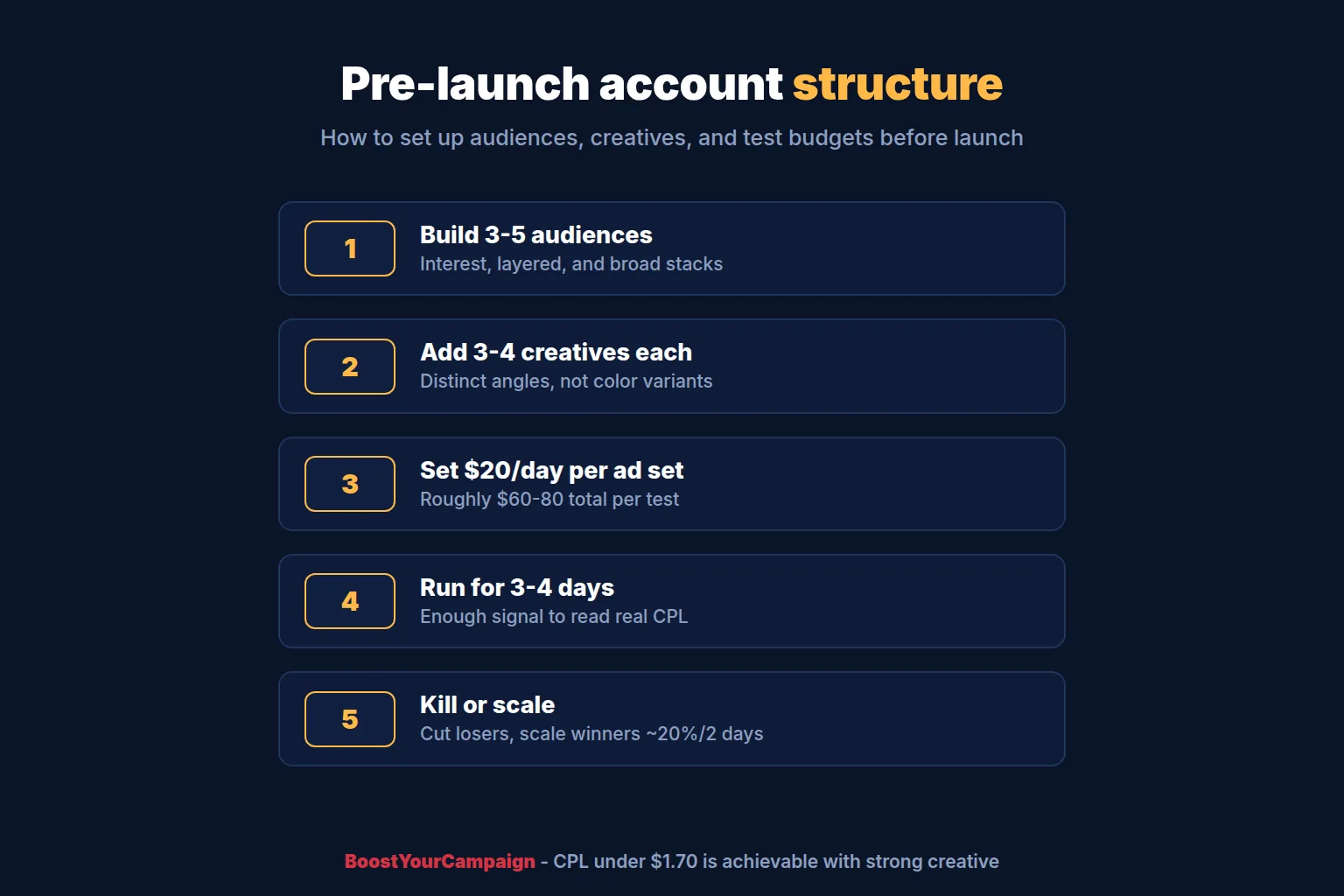
Structure the pre-launch account around one objective: leads to your landing page. Build 3-5 audiences (see below) and give each 3-4 distinct creatives, not just color or headline variants of the same idea, so you have real combinations without spreading budget too thin for any ad set to get a fair test.
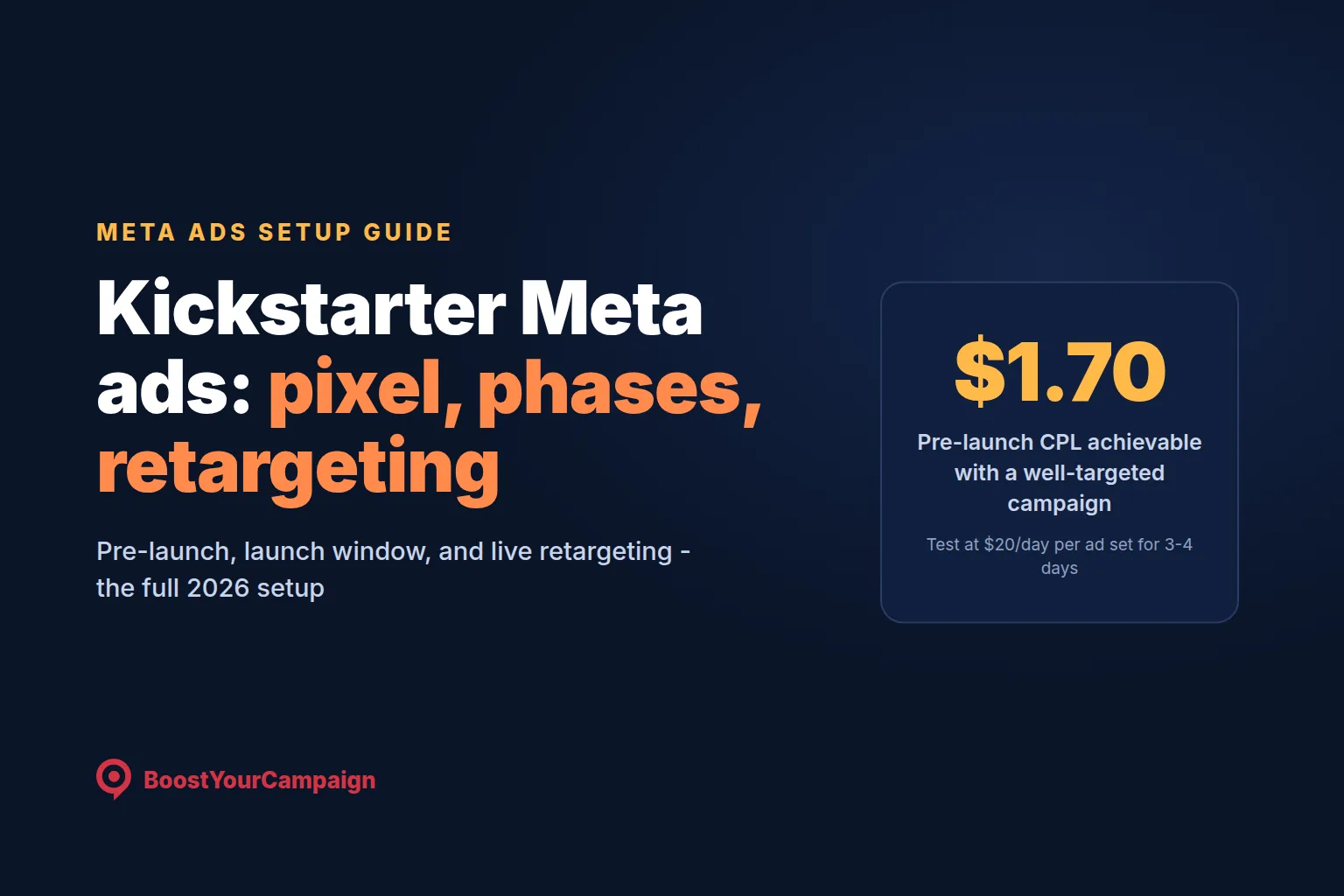
Test each ad set at $20 a day for 3-4 days before making a call - roughly $60-80 per test, enough for Meta's delivery system to clear the learning phase and for you to see a real cost per lead, not a first-day fluke. A CPL under $1.70 is achievable for a well-targeted campaign with strong creative; treat a climbing CPL as a signal to look at the offer or creative before spending more.
Kill ad sets clearly underperforming their siblings, and reallocate that budget to whichever combination is winning. Scale winners in increments, roughly 20% every couple of days, rather than doubling spend overnight and resetting the learning phase.
4) Creative that works for crowdfunding
Creative decides most of what your ad spend actually buys. A product demo video in the 15-45 second range is the strongest single format for pre-launch: hook in the first 3 seconds (the problem, the surprising feature, or the price), show the product doing the thing it does, and put price and reward tier on screen rather than burying them in a caption.
Test UGC-style clips (a real person talking to camera, handheld footage) against a more polished brand video early. Crowdfunding audiences often respond better to something that looks like a real backer's phone footage than a studio ad, though this varies enough by category to be worth testing rather than assuming. Static images still have a place for retargeting an audience that already knows the product, but video tends to outperform for cold pre-launch traffic. See our video length and cost guide for what a demo actually costs. If testing time is short, start with the hook and thumbnail - a weak first three seconds sinks an otherwise good ad.
5) Audiences: who to target in each phase
Pre-launch audiences typically stack three types: an interest audience around your product category and adjacent brands, that same interest audience layered with "Kickstarter" or "crowdfunding" as an added filter, and a broad, untargeted audience that leans on Meta's delivery system rather than manual targeting. In 2026, broad targeting frequently performs as well as or better than narrow interest stacks once you have any pixel data at all.
Once you have leads, build lookalike audiences from your email list and, separately, from your $1 VIP reservers. VIP lookalikes tend to be the tightest, highest-intent audience you can build pre-launch, since they're modeled on people who already paid something.
Geo mix matters more than creators expect: US, UK, EU, Canada, and Australia are the core markets where Kickstarter backing behavior is strongest, and splitting budget across them rather than running US-only usually lowers blended CPL, though shipping cost and delivery timelines per region need pricing into your reward tiers first.
6) Retargeting during the live campaign
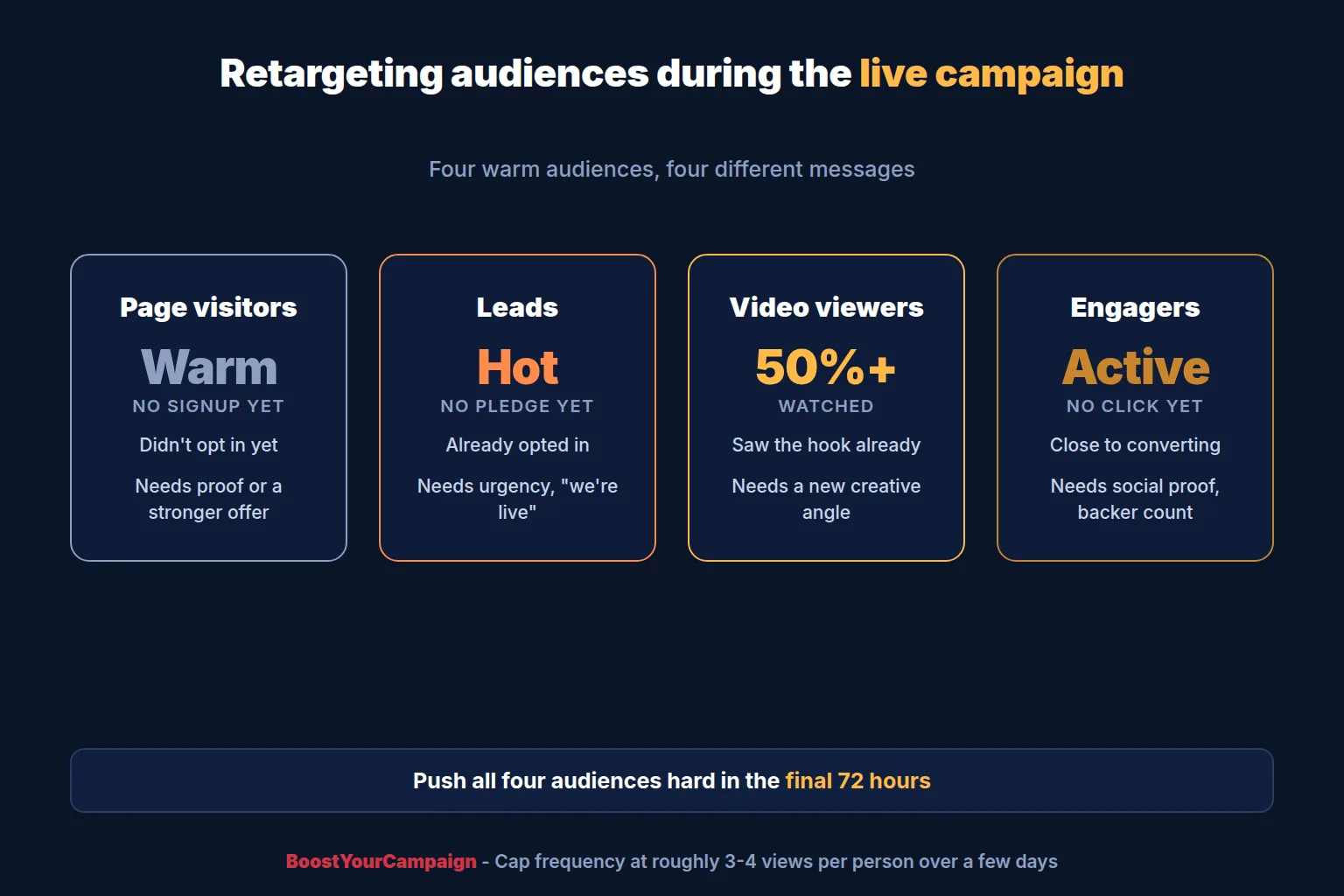
Once the campaign is live, kickstarter retargeting ads are usually the highest-ROAS spend in the whole budget, because every audience here has already shown some intent. Four warm audiences do most of the work: landing page visitors who never signed up, leads who signed up but haven't pledged, people who watched 50%+ of your video ads, and people who engaged (comments, shares, saves) without clicking through.
Each audience needs a different message, not the same ad repeated. Landing page visitors who bounced need a reason they didn't act the first time - social proof, a stronger offer, or an answer to an objection. Leads who haven't pledged need urgency and a direct "we're live, here's your reward" message, since they already opted in. Video viewers respond to a different creative angle than the one that got them watching. Engagers respond to social proof, like backer count or stretch goals hit, more than the original pitch.
Cap frequency at roughly 3-4 views per person over a few days, and rotate creative into these audiences at least weekly to avoid fatigue. In the final 72 hours, retargeting spend usually gets a deliberate push across all four audiences at once, since urgency and an "ending soon" message convert warm traffic at its best rate of the whole campaign.
7) Scaling rules and budget pacing
Kickstarter campaigns follow a predictable shape: a surge in the first 48 hours, a slower middle stretch, and another surge in the final 48-72 hours. Ad pacing should follow that shape rather than spend evenly across the whole campaign. Front-load budget into the launch window so your pre-launch list converts while momentum is working for you, ease off through the middle weeks where cold traffic converts weakest, and push again as the deadline approaches.
When you think about ROAS, include Kickstarter's platform and payment fees, not just ad spend versus pledge revenue - a campaign that looks profitable on gross pledges can be thin once fees and fulfillment cost are subtracted. Calculate a break-even cost per backer (average pledge, minus fees, fulfillment, and margin) before you scale, so you know the ceiling you're scaling toward.
8) Reading your results
Three numbers tell you almost everything about how kickstarter ad management is going: cost per lead pre-launch, cost per backer live, and ROAS once you're converting. A CPL in the $1-3 range is healthy, with under $1.70 achievable for a well-targeted campaign; a CPL creeping toward $5-8 is worth investigating before adding budget. Cost per backer runs higher than CPL by design, and what counts as "good" depends on pledge price - a $50 campaign needs a lower cost per backer than a $200 one.
As a rough, hedged benchmark, top campaigns with strong creative and a warm pre-launch list have reported ROAS somewhere in the 2-10x range, though this varies widely by category and should not be treated as a guarantee. What matters more than a specific number is the trend: cost per backer climbing week over week while creative stays fresh means the audience is saturating, not a reason to spend your way through it.
9) Common mistakes that quietly kill Kickstarter ad performance
A handful of mistakes account for most of the wasted ad spend we see. Sending cold traffic straight to Kickstarter instead of a landing page throws away the pixel data and retargeting audiences that make every later phase cheaper - the single most expensive shortcut in kickstarter pre launch advertising. Skipping Conversions API and relying on the browser Pixel alone means your numbers quietly under-count conversions as privacy changes strip out client-side events, leading to bad scaling decisions on numbers that look worse than reality.
Running one creative for the whole campaign is another common failure: even a strong ad fatigues as the same audience sees it repeatedly, and campaigns that never refresh creative see cost per result climb for reasons unrelated to the offer. Turning off retargeting costs more than it saves, since warm audiences convert at a fraction of the cost of cold ones. And stopping ads the moment a campaign hits its goal leaves money on the table - a funded campaign with momentum still has audiences worth reaching, and stretch goals give ads something concrete to push.
| Phase | Goal | Destination | Audience | Creative | Budget share | Key metric |
|---|---|---|---|---|---|---|
| Pre-launch | Build the email list and VIP reservations | Landing page | Interest stacks, broad, early lookalikes | Demo video, UGC vs polished | ~30% | Cost per lead |
| Launch window (days 1-5) | Convert the warm list into backers | Kickstarter page | Pre-launch leads, VIP reservers | Live-offer video, urgency | ~40% | Cost per backer |
| Live retargeting and scaling | Convert warm traffic, scale cold | Kickstarter page | Site visitors, non-pledging leads, video viewers, lookalikes | Rotating creative, social proof | ~30% | ROAS |
How BoostYourCampaign fits
BoostYourCampaign runs Meta, Google, and TikTok ads for pre-launch and live Kickstarter campaigns under a skin-in-the-game model: we can front or share ad spend alongside the client's budget rather than charging a flat fee regardless of outcome, so our incentive on cost per lead and cost per backer matches yours. The same team that builds the ads also produces the video, so the demo video that wins in pre-launch testing is usually the same asset re-cut for launch-window and retargeting creative, with no handoff delay between what's working in testing and what goes live.
Since 2010 we've run more than 4,600 campaigns and helped raise over $734 million, with a 4.9/5 rating across 300+ verified reviews. If you want a team that has already built this tracking, structure, and creative rotation many times over, see our services or read how our skin-in-the-game model works. If you're comparing agencies more broadly, our PR and advertising agencies guide covers how they stack up outside of paid ads.
Meta ads setup checklist for a Kickstarter launch
- Meta Pixel and Conversions API installed and verified on your landing page, not on Kickstarter
- UTM parameters on every ad link, plus Kickstarter referral tags or a custom referrer
- 3-5 pre-launch audiences built, each with 3-4 distinct creatives ready to test
- $20/day per ad set confirmed, with a 3-4 day minimum window before kill/scale calls
- Lookalike audiences ready from leads and $1 VIP reservers once you have enough data
- Retargeting audiences pre-built for site visitors, non-pledging leads, video viewers, and engagers
- Budget pacing plan that front-loads the launch window and the final 48-72 hours
- A break-even cost-per-backer number, with Kickstarter fees and fulfillment cost included
Frequently Asked Questions
Do Meta ads work for Kickstarter?
Yes, for most categories with a reasonable price point and margin. Meta remains the primary paid channel for Kickstarter because it finds cold audiences at scale pre-launch and retargets warm ones once live. Results vary by category and creative quality, but a working pre-launch funnel with a landing page and pixel data behind it is the difference between ads that work and ads that just spend money.
How much should I spend on Kickstarter ads?
Work backwards from your goal: divide it by your average pledge to get backers needed, subtract what your pre-launch list will likely deliver, and budget the rest against a realistic cost per backer. Pre-launch testing is inexpensive - $20/day per ad set for 3-4 days - so most of the real spend decision happens once you're live and scaling what works.
Can you put a Facebook pixel on a Kickstarter page?
No. Kickstarter does not allow creators to add a Meta Pixel, Conversions API code, or any third-party tracking script to a project page. That's why a landing page you control is a required part of the setup, not an optional extra - it's the only place your pixel and CAPI data can live.
How do you retarget Kickstarter backers?
You don't retarget people who already backed - you exclude them and retarget everyone who showed intent but hasn't pledged: landing page visitors who didn't sign up, leads who haven't pledged, video viewers, and people who engaged with your ads. That's the warm pool that converts cheapest once the campaign is live, built from pixel and CAPI data collected before and during launch.
When should I start running ads for a Kickstarter?
Most pre-launch funnels run several weeks to a couple of months before launch, giving you time to test creative and audiences on a small budget, build an email list, and collect enough CAPI data to make launch-week retargeting worth something. Starting on launch day with no warm list means paying cold-traffic prices without the momentum a pre-launch funnel builds.
What is a good cost per lead for Kickstarter ads?
A CPL in the $1-3 range is a healthy pre-launch result, and under $1.70 is achievable for a well-targeted campaign with strong creative, based on results we've seen across tests. Treat a CPL climbing toward $5-8 as a signal to look at the offer or creative rather than a reason to push through with more spend.
Should I send ads to my Kickstarter page or a landing page?
Send pre-launch ads to a landing page you control, always - Kickstarter's page can't carry your pixel or CAPI, so cold traffic sent straight there is largely unmeasurable and unretargetable. Once you have warm audiences built from landing page data, ads for those audiences typically point straight at the Kickstarter project page, since that's where the pledge happens.
Should I hire a Kickstarter ads agency or run ads myself?
It depends on whether you have time to build tracking correctly, test creative in small batches, and read cost per lead and cost per backer honestly, week over week, while running the rest of the campaign. An agency earns its fee by having already made the setup mistakes on someone else's budget; DIY is realistic with marketing experience and time to test. See our Kickstarter ads agency guide for the fuller breakdown.
If you want tracking, structure, and creative built for you before you spend a dollar, reach out through /contact and we'll walk through your launch date and budget.
Want results like these for your campaign?
We've helped 4,600+ creators raise over $734M. Let's pressure-test your launch plan and find the highest-leverage fixes before you go live.
Talk to an expert →Get the free 87-step launch checklist
The exact pre-launch, live-campaign and fulfillment steps we use across 4,600+ launches. Free PDF, emailed instantly.
You're in - check your inbox. Open the checklist now ->