This is a reference for how Kickstarter works as a platform: who can launch, what verification asks for, how rewards are actually built, what locks at launch, how fees and payouts work, and what the pledge manager, backer survey and fulfillment dashboard do. It is the mechanics, not the strategy. For how to plan and run a campaign, our Kickstarter campaign handbook covers that side, and our campaign plan guide works backwards from launch day.
Updated 24 September 2026. Checked against Kickstarter's current help centre on that date, including the EU customs change of 1 July 2026 and the Pledge Over Time payout schedule that changed on 15 January 2026.
Kickstarter is all-or-nothing: miss your goal and nobody is charged. You must be 18+ and verified in one of 25 eligible countries, with a checking account in the same country and the same name as the verified entity. Identity verification runs through Stripe. Your funding goal and deadline both lock permanently at launch, and launching is a manual button press, not a schedule. Fees are 5% to Kickstarter plus roughly 3 to 5% card processing, charged only if you fund. Rewards are built items first, then tiers. After funding you get a pledge manager, a backer survey with automatic SKUs, and a fulfillment dashboard.
| Problem | Where to go |
|---|---|
| Can I even launch from my country | Section 1, eligibility |
| I cannot log in, or my email is not recognised | Section 2, accounts |
| My identity verification failed | Section 3, verification |
| My bank account was rejected | Section 4, bank accounts |
| How do I build rewards and add-ons | Section 6, rewards |
| How do I charge shipping | Section 8, shipping |
| What do the fees actually come to | Section 11, fees and payouts |
| How do I refund a backer | Section 17, refunds |
| How do I contact Kickstarter | Section 20, contacting support |
1) Who can launch, and from where
Backers can be almost anywhere with a major debit or credit card. Creators cannot. To launch you must meet the requirements for one of 25 countries: Australia, Austria, Belgium, Canada, Denmark, France, Germany, Greece, Hong Kong, Ireland, Italy, Japan, Luxembourg, Mexico, the Netherlands, New Zealand, Norway, Poland, Singapore, Slovenia, Spain, Sweden, Switzerland, the United Kingdom and the United States.
You can set your project's displayed location to whichever city best describes it, on the Basics tab, but the physical address on your verification documents has to be in one of those countries. The displayed location and the verified address are different things, and only the second one decides eligibility.
| Requirement | Detail |
|---|---|
| Age | 18 or older. Under-18s can take part in creating the project under the supervision of the creator, but cannot be the creator |
| Raising as an individual | You must be a resident of the launch country and hold a government ID from that same country. Inside the EU, an ID from another EU country is accepted |
| Raising as a business or nonprofit | Launch in the country where the entity is registered. The person setting it up must be an owner or executive with authority to represent it |
| Ownership disclosure | All beneficial owners, and directors where requested, must be disclosed and verified, with government IDs and tax documents for each |
| Bank account | A supported account in the launch country, owned by and in the name of the individual or entity raising funds |
If you are outside the 25, the documented workaround is to establish a business where Kickstarter operates, for example with Stripe Atlas in the US. That is a real option and plenty of creators use it, but treat it as a tax and legal decision rather than a formality, and take advice before you incorporate somewhere to run one campaign. Source: Kickstarter on who can use Kickstarter.
2) Accounts, and why there is no password
Kickstarter no longer uses passwords at all. You enter your email, a six-digit code arrives, you enter it, you are in. The code is valid for ten minutes and works once. If two-factor authentication is on, your authenticator app code comes next. Ticking "Remember this device for 30 days" skips the code on that browser until you sign out or clear your data.
You can also use "Continue with Apple". A new Apple sign-in creates the account automatically.
The four account problems support sees most
- "I signed up with Facebook." Facebook login is gone. Log in with the email address that was attached to the Facebook account, using the code. Make sure you are fully logged out first
- "I forgot my password." There is no password to forget. Use the code
- "My email is not recognised." Either it is a different address than you think, or the account was created with an Apple ID, in which case you must use the Sign in with Apple button rather than typing the address
- "Can I merge two accounts?" No. Each account needs a unique email and merging is not supported. You can cancel live pledges and re-pledge on the account you want to keep, but a collected pledge cannot be transferred and stays on the account that made it
One warning worth repeating to backers: deleting a Kickstarter account also deletes the entire history of projects that account backed. Source: Kickstarter on logging in and common account issues.
3) Identity verification, and the one thing that fails it
Verification is mandatory and runs from the Payment tab of your project draft. You choose how you are raising funds, individual, business or nonprofit, then continue to Stripe. Expect to supply names, birthdates, addresses, tax identification numbers and government-issued documents, for yourself and for every other individual or entity attached to the project.
It is usually quick but can take a few business days, so build slack into your launch timeline. If you have heard nothing after five business days, contact support rather than waiting.
Typos are the single most common reason verification fails. Not fraud, not missing paperwork, typos. Before you submit, check that every name, birthdate, address and tax number matches your documents character for character.
When a document is requested:
- Clear, in colour, no edges cut off, no shadows
- If more than one document type is asked for, do not upload the same one twice
- Acceptable types vary by country, so check before scanning
The specific error text comes from Stripe, not Kickstarter, and appears after you click through to them. Quote that text if you end up contacting support. Source: Kickstarter on verifying your information.
4) Bank accounts that actually work
The account must be a checking account that supports direct deposits in the currency you are raising in, owned by and registered in the name of the verified individual or entity.
Not supported, and a common cause of failed payouts: wire transfers, savings accounts and virtual bank accounts. That last one catches people who run everything through a fintech card account.
- United States: the account must accept ACH direct deposit. Use the routing number for paper and electronic transfers, not the wire transfer one
- Japan: only "Futsuu" accounts are accepted
- Europe raising in euros: an IBAN in a wide list of eligible countries is fine, and it does not have to match your project country. A Danish project raising euros can use an IBAN in Spain, Germany, Poland and many others
If the Payment tab rejects your details, retype them with no dashes, spaces or placeholder zeros. Banks format account numbers for humans and the form wants the raw digits. Source: Kickstarter on supported bank accounts.
5) The funding goal, and the two things that lock forever
Funding is all-or-nothing. Miss the goal and backers are not charged and you receive nothing.
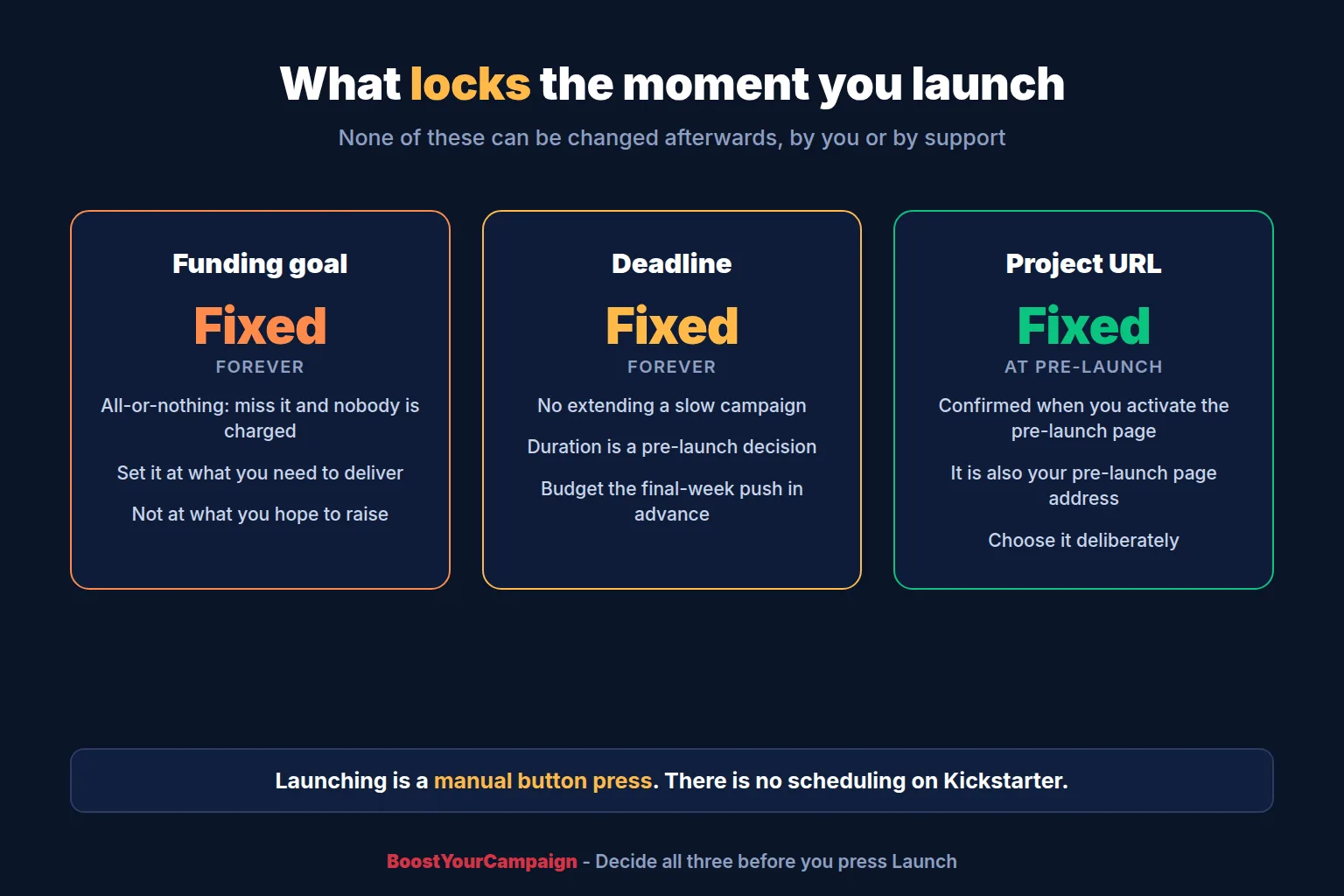
Once you launch, you cannot change your funding goal or your deadline. Not by contacting support, not for any reason. That single rule should shape how you set both.
Kickstarter's own framing is two questions, and they are better than most goal-setting advice:
- If you fund at exactly 100% and not a penny more, can you actually deliver every reward? If not, the goal is too low
- If you end at 90% and collect nothing, will you regret not having set a lower goal? If yes, lower it, but only as far as the first question still holds
The goal is what you need to complete the project including production, materials, shipping and fees. It is not what you hope to raise. Our funding goal strategy guide covers how to set it against a real launch plan, and the cost breakdown covers what a campaign actually consumes.
The Project Budget tool
For projects in Design, Technology, Arts and Fashion only, the Funding tab offers a Project Budget spreadsheet. You enter the email you want to use, click Generate my spreadsheet, and Kickstarter sends a Google Sheets invitation. You must be signed into Google with that same address to open it.
Once filled in, the first tab generates a visual breakdown you can publish on your live project page in the Project Budget section, as a percentage or currency view. Two reasons to do it: backers get to see where their money goes, and Kickstarter states it increases the chance of being featured. You can refresh the graphic mid-campaign from the same tab.
Kickstarter can see what you enter, and says it will not share it without your permission. Source: Kickstarter on the Project Budget tool.
6) Building rewards: items first, then tiers
This is the part creators get wrong, because the order is not obvious. On Kickstarter you itemize everything first, then assemble tiers out of those items. Building tiers before items means redoing the work.
Step 1: create your items
Rewards tab, Items, then New item. Each item gets a title that describes it plainly, such as "Deluxe board game", and optionally an image.
Image specs, which are strict: 3:2 ratio, no smaller than 348 x 232 pixels, no larger than 50MB, as JPG, PNG or GIF.
Itemising first pays off three times over: it is the building block for every tier and add-on, it tells you the quantity of each physical thing you have to manufacture, and it is what the backer survey uses to collect variant choices later. Skip it and the survey has nothing to work with.
Step 2: build the tiers
Rewards tab, Reward tiers, then New reward. Most creators run three to ten tiers. Each needs a title, amount, description, estimated delivery, the items it contains, whether it includes physical goods, how shipping works, and optionally quantity, time limit and audience.
Add-ons are built the same way and drawn from the same item list.
Step 3: set availability deliberately
Every reward carries three availability levers, and they do different jobs:
- Quantity, a hard cap. Real scarcity, shown to backers
- Time limit, for early-bird style windows
- Audience, which is how Secret Rewards work
Source: Kickstarter on itemising rewards and adding rewards.
7) Secret Rewards
Set a reward's Audience to "Select backers only (Secret Reward)" and it disappears from your public page. Save it and Kickstarter gives you a unique link for that specific reward, which you share with whoever should have it. Both reward tiers and add-ons can be secret.
Four constraints that decide whether this works for you:
- Backers must be logged in to view or pledge a Secret Reward
- Desktop and mobile web only. Not the app
- A secret tier and a secret add-on need separate links, and the backer has to open both
- Once a link is opened, that reward stays visible to them
The obvious uses are a tier for your newsletter list or social following, an exclusive for backers who have supported you before, and a bulk tier for retailers that you do not want on the public page. That last one is the strongest: retail and distributor pricing belongs somewhere your individual backers cannot see it. Our Secret Rewards guide covers how to use them without annoying everyone else. Source: Kickstarter on Secret Rewards.
8) Shipping: decide the model before you build a single tier
Your first decision is on the Preferences tab, under Shipping: are you charging shipping at pledge, or later through the pledge manager? Everything downstream depends on it.
Charging later is the safer default for physical products with uncertain freight, because you are quoting a real rate months closer to fulfillment instead of guessing a year out. Charging at pledge is simpler and suits low-variance items shipping to few countries.
If you charge during the campaign, each tier and add-on takes one of four options:
| Option | Use it when |
|---|---|
| Digital delivery, no shipping | The reward is delivered digitally, such as a film file or PDF |
| Local in-person receipt, no shipping | Backers collect it at a specific place, such as an event |
| Only ships to certain countries | You restrict destinations and set a cost per country. The right choice for most first campaigns |
| Ships anywhere in the world | One global rate, with the option to set different rates for outlier countries |
The additional amount appears in the reward description and backers in those countries are prompted to pay it with their pledge.
Before you set any number, get the size, dimensions and weight of both rewards and add-ons, and quote them with more than one provider. Shipping is priced on weight and dimensions, and packaging counts. Build a buffer: under-promising on delivery leaves you room to beat the estimate. Our shipping cost calculator gives per-region estimates, and our US and EU fulfillment services exist to keep cross-border duty off every parcel. Source: Kickstarter on charging shipping costs.
9) The pre-launch page
The pre-launch page is where you collect followers before going live, and every follower gets an email when you publish a pre-launch update or when the project launches.
Access depends on your history: first-time creators get it only after the project has been submitted for review and approved, while repeat creators can reach the Promotion tab before review. You activate it after confirming your project URL, and that URL serves as the pre-launch page URL until launch.
The desktop page automatically shows your title and subtitle, image, category, location, an editable pre-launch description, your creator name and avatar, and any pre-launch updates. One gap worth knowing: the Kickstarter app does not show the pre-launch description, so do not put anything load-bearing only there.
Pre-launch pages are searchable alongside live projects and appear under Upcoming Projects.
The detail that catches people every time: launching is manual. There is no scheduling. Someone has to press "Launch project" at the moment you want to go live, which matters if your launch time is 9am in a timezone nobody on your team is awake for. Source: Kickstarter on pre-launch pages. Our pre-launch landing page guide covers what to do with the followers once you have them.
10) What you cannot change after launch
| Locked | Consequence |
|---|---|
| Funding goal | Set it at what you need to deliver, not what you hope for. There is no revision |
| Campaign deadline | No extending a slow campaign. Duration is a pre-launch decision |
| Project URL | Confirmed when you activate the pre-launch page |
| Rewards already pledged to | Editable only within limits once backers are attached |
Two of those are worth planning around properly. The goal locks, so the entire campaign hangs on a number you choose before you have any live data. The deadline locks, so your final-week push has to be budgeted for in advance rather than improvised when the graph flattens.
11) Fees, payouts and getting an invoice
If the project funds, Kickstarter takes 5% of funds collected and Stripe takes a card processing fee of roughly 3 to 5%. If the project does not reach its goal, no fees are collected at all.
So budget on roughly 8 to 10% off the top before you have paid for anything you promised. That is the number to feed into your funding goal.
Pledge manager fees are the same: 5% platform fee on all funds except taxes, plus Stripe's variable processing fee on the full payment including taxes. There is no separate charge for using the pledge manager.
Your invoice and funding summary
About 48 hours after a payout clears, go to Payouts & Taxes in the creator navigation. Every payout is listed, including separate ones for Pledge Over Time and pledge manager funds. Click a payout to see gross pledges, dropped pledges, refunds, the Kickstarter fee and the processing fee, then View invoice for a printable version.
"Dropped pledges" is the line people do not expect: pledges that failed to collect after the campaign ended. Budget for some. Source: Kickstarter on fees and payout invoices.
12) Pledge Over Time
Pledge Over Time lets backers split a pledge into three payments. No extra fees, no third-party signup, no interest. It exists to make higher tiers reachable, and it does move average pledge value.
The catch is entirely on your side, and it is a cash flow catch. Your first payout includes only the first of the three charges. The remaining two are collected later and paid out in two further payouts, roughly eight weeks and twelve weeks after your project ends.
So a campaign with heavy Pledge Over Time uptake has materially less cash on day one than its headline total suggests. If you are paying a manufacturing deposit out of the first payout, model that before you switch it on.
Projects whose first Pledge Over Time payout landed before 15 January 2026 are on the older schedule, where the last two charges were combined into a single payout at around twelve weeks. Source: Kickstarter on Pledge Over Time.
13) Running the live campaign
Updates
Click Create Update on the left of your project page. You choose a freeform update or a Q&A update, add a title and body with rich text, images, video and audio, and optionally attach a poll.
Two dropdowns do the real work:
- Visible to: public by default, or Backers only, or Followers only. That third option is underused. It reaches people who have not pledged yet and is one of the few direct levers you have on undecided traffic during the campaign
- Notifications: all backers by default, or Select Tiers, where you untick the tiers you do not want to email. Useful when an update only concerns one reward level
Save a draft, preview it, then publish. Our campaign update strategy covers cadence and what to actually write.
Collaborators, and the permission built for agencies
The Collaborators page lets you add team members with granular permissions:
| Permission | What it allows |
|---|---|
| Edit project | Basics, story, rewards, FAQs and the Spotlight page |
| Manage community | Post updates and comments, view backer-only updates, mark spam, reply to backer messages. Needs Coordinate fulfillment as well to read those messages |
| Coordinate fulfillment | Manage surveys and access the backer report |
| Configure pledge manager | Set up and launch the pledge manager |
| Analytics | Creator dashboard only: project stats, backer referral data, follower stats, attribution |
Kickstarter explicitly recommends the Analytics-only permission for a marketing agency that needs performance data but not editing rights or access to backer personal data. That is the right setting to give us, or anyone else running your ads, and if an agency asks for more than that on a standard engagement, ask them why. Source: Kickstarter on the collaborators tool.
14) Analytics and ad tracking
Kickstarter supports Google Analytics, the Meta pixel and the Meta Conversions API on your project page. Allow up to 24 hours for data to appear after setup.
To track conversion rate in GA4 you have to mark events as conversions yourself: with Editor or Administrator access, go to admin settings, then Conversions under Data display and New conversion event, or find the event under Events and switch on "Mark as conversion". If the toggle is greyed out, you do not have the permission level.
Kickstarter's own caveat is worth quoting to anyone judging ad spend on this data: treat it as a rough guideline rather than a precise measure of return on ad spend. Cross-platform attribution on a page you do not control is approximate, which is why we run paid campaigns against the creator dashboard's referral data and our own tracking as well. Our Meta ads guide covers what to optimise on. Source: Kickstarter on tracking conversion rate.
15) After funding: the pledge manager and backer survey
The pledge manager only becomes available after your project launches, and only if your project meets the eligibility criteria. There is no upfront cost; Kickstarter deducts its usual fees from payments made inside it.
Find it as Pledge manager in the creator navigation on the left of your project page. It is a series of sections, some optional, each with a Start button:
- Welcome message, optional. Pre-filled with something generic. Replace it. This is the first thing backers see when the pledge manager opens, and a personal message with images or links converts add-ons better than boilerplate
- Configure rewards and add-ons, optional. Choose what is available inside the pledge manager, including letting backers upgrade their tier, buy add-ons, and letting entirely new backers buy after the campaign ended
- Create survey, optional but in practice essential for physical rewards
Building the backer survey
Under Item questions you will see every item you offered, including add-ons. For each, click Create questions, then Create variant for things like colour or size. You can add more than one variant per item, though Kickstarter recommends no more than three. Each variant needs a set of values, which is what the backer picks from.
SKUs generate automatically from the item name and variant values: "Reward 1" in small and blue becomes Reward-1-Small-Blue. You can edit them later in the SKU table. That naming is what your fulfillment partner will work from, so if you have a warehouse with its own conventions, fix the SKUs before you send the survey, not after.
Timing rule: you can build the survey any time after launch, but you can only send it once the project has ended successfully and pledges have been collected. It also goes out automatically when you launch the pledge manager.
If some backers never respond, Kickstarter's guidance is to make reasonable attempts to contact them and then move on with the next stage rather than holding up everyone else. Our pledge manager guide compares Kickstarter's tool against the standalone options. Sources: the pledge manager, building your backer survey and collecting backer information.
16) Late pledges
Late Pledges let you keep collecting after a successful campaign ends. Backers find the project, hit Back this project or open the Reward tab, pick from what is still available, choose a shipping country where relevant, add add-ons, and pay.
The difference that matters, and which you should say plainly on your page: payment is taken immediately, and a late pledge cannot be cancelled or modified. Not by the backer, anyway. That is stricter than a campaign pledge and it generates messages if nobody warned them.
Late pledge payouts appear separately under Payouts & Taxes and continue until late pledging ends. Source: Kickstarter on late pledges.
17) Refunds, and where the money comes from
Refunds run through the backer report, reachable from the creator tools menu. Find the backer, click their name, then Issue a refund.
You can refund in full or in part. A full refund returns 100% of the original pledge including fees. A partial refund can be a specific amount per item, a general amount, or removing an item from the pledge entirely. You choose a reason and can attach a message that goes out with the refund email.
Now the part that surprises creators: you choose a refund source from the cards saved to your account, or enter a personal credit card. The refund is issued from that card. It does not come out of your raised funds. If you have already spent the payout on manufacturing, a wave of refund requests lands directly on your own card.
That is the strongest practical argument for holding a reserve after payout. Our guide to campaigns that go wrong covers the rest of that scenario. Source: Kickstarter on issuing refunds.
18) The fulfillment dashboard and backer report
Once a project funds, the Fulfillment dashboard pulls together what you need to actually produce and ship. It links to the backer report and backer surveys and shows:
- Pledges per country, which is what you quote international freight against
- Backers per reward tier and add-on, for budgeting
- Reward item inventory breakdown, for the manufacturing order
- Automatically generated SKUs with counts, final once every backer has answered the survey
- Downloadable reports for production and fulfillment planning
- Survey response rate and percentage of rewards shipped
The pledge breakdown at the top reconciles your headline backer number against the number you will actually ship to, which is always lower once dropped pledges and refunds are accounted for. Order stock against that number, not the campaign total. Source: Kickstarter on the fulfillment dashboard.
19) Taxes, the 1099-K, and customs
The US 1099-K
Kickstarter must file a 1099-K for a successful project where the verified entity and bank account are US-based and the project collected at least $20,000 across more than 200 transactions. It goes to you, to the IRS, and to some states.
State thresholds are much lower than the federal one, which catches smaller projects out:
| Threshold | States |
|---|---|
| Federal rules apply | Alabama, California, Connecticut, Florida, Georgia, Hawaii, Kansas, Maine, Mississippi, New York, North Carolina, Oregon, Tennessee |
| $2,500 gross volume | Arkansas |
| $600 gross volume | District of Columbia, Maryland, Massachusetts, Montana, Vermont, Virginia |
None of this is tax advice and Kickstarter does not give any either. Talk to an accountant before you launch, not in April. Our crowdfunding tax guide covers the shape of the problem. Source: Kickstarter on the 1099-K.
Customs, and the EU change of July 2026
Duties, taxes, VAT and clearance fees on an international reward are the backer's responsibility, and you are legally required to declare the goods and their value properly on the customs form.
The change every EU-shipping campaign needs to know: from 1 July 2026 the EU removed the customs duty exemption on goods under €150. A flat duty of €3 per item type now applies, and several member states have added national handling fees on top. Note it is per item type, not per parcel, so a reward containing three distinct items is charged three times.
Say where rewards actually ship from on your live page. A project's location does not tell backers where the parcel originates, and a European backer expecting an EU dispatch who receives an import bill from Asia is a support ticket and a refund request. Our EU shipping and customs guide covers the options. Source: Kickstarter on customs fees.
20) Contacting Kickstarter support
The primary route is the messenger bot in the bottom right of the Help Center, which hands off to a human when needed.
There is a trap here worth knowing before you conclude support does not exist: the messenger does not load unless cookies are enabled. Go to the footer of kickstarter.com, open Cookie Preferences, and enable all three of Functional, Marketing and Analytics. Plenty of creators with strict browser settings see no support option at all and assume there is none.
Kickstarter also lists an email address on its Contact Us page. We are not reproducing it here, because the help centre obfuscates it against scraping and a wrong address is worse than none. Read it from their contact page directly.
Reporting a project
Scroll to the bottom of any pre-launch or campaign page for Report this project to Kickstarter. You pick a category, concerns about project completion, rule breaking, spam or abusive behaviour, or intellectual property, then sub-categories, then a written summary. Trust & Safety reviews it.
When a project you backed is late
Worth understanding as a creator, because it shapes what your backers expect. Kickstarter's position is that a pledge is not a purchase or a pre-order, the estimated delivery date is a goal rather than a guarantee, and delays are normal and frequently run past six months. That is genuine cover for an honest creator who communicates. It is not cover for going silent. Source: Kickstarter on delayed projects.
How BoostYourCampaign fits
Everything above is the platform. None of it raises money, and Kickstarter itself is clear that discovery follows traffic rather than creating it.
- Pre-launch audience building, which is what decides day one
- Campaign video from our own studios, and page design and copy
- Paid acquisition on Meta, Google and TikTok, run against the Analytics collaborator permission rather than your whole account
- Fulfillment from our own warehouses in the US and EU, which is how you avoid the new EU per-item duty on every parcel
- 4,600+ campaigns since 2010, $734M raised, and a free re-launch if a campaign misses its goal
Frequently Asked Questions
Which countries can launch a Kickstarter project?
Twenty-five: Australia, Austria, Belgium, Canada, Denmark, France, Germany, Greece, Hong Kong, Ireland, Italy, Japan, Luxembourg, Mexico, the Netherlands, New Zealand, Norway, Poland, Singapore, Slovenia, Spain, Sweden, Switzerland, the United Kingdom and the United States. The address on your verification documents must be in one of them, even though your project's displayed location can be any city you choose.
What are Kickstarter's fees in 2026?
Kickstarter takes 5% of funds collected and Stripe takes roughly 3 to 5% in card processing, so budget around 8 to 10% in total. Nothing is charged if the project does not reach its goal. Pledge manager payments carry the same fees, with the 5% platform fee applied to everything except taxes and the processing fee applied to the full amount including taxes.
Can I change my Kickstarter funding goal after launching?
No. The funding goal and the campaign deadline both lock permanently at launch and cannot be changed by anyone, including support. Set the goal at the amount you need to deliver every reward, including fees and shipping, rather than what you hope to raise.
Why did my Kickstarter identity verification fail?
Typos are the most common cause. Every name, birthdate, address and tax number has to match your government documents exactly. Document uploads must be clear, in colour, uncropped and shadow-free, and if two document types are requested you cannot upload the same one twice. The specific error comes from Stripe and appears after you continue to them. If nothing has happened after five business days, contact support.
Why will Kickstarter not accept my bank account?
It must be a checking account that takes direct deposits in your project currency, in the same country as your project, in the name of the verified individual or entity. Wire-only accounts, savings accounts and virtual bank accounts are not supported. US accounts need ACH and the paper and electronic routing number rather than the wire one. If details are rejected, retype them without dashes, spaces or placeholder zeros.
Do I have to build items before reward tiers on Kickstarter?
Yes, in practice. You itemize everything first on the Rewards tab, then assemble tiers and add-ons from those items. Items are also what the backer survey uses to collect variant choices and what generates your SKUs, so skipping the step leaves the survey with nothing to work with. Item images must be 3:2, at least 348 x 232 pixels and under 50MB.
How do Secret Rewards work on Kickstarter?
Set a reward's Audience to "Select backers only (Secret Reward)" and it is hidden from your public page. Kickstarter generates a unique link you share with chosen backers. They must be logged in, it works on desktop and mobile web but not the app, and a secret tier and secret add-on need separate links that each have to be opened.
When does Kickstarter pay out Pledge Over Time pledges?
Your first payout includes only the first of the three charges. The remaining two are collected later and paid in two further payouts roughly eight and twelve weeks after the project ends. Campaigns whose first Pledge Over Time payout came before 15 January 2026 are on the older schedule where the last two charges arrived together at around twelve weeks.
Where does the money come from when I refund a Kickstarter backer?
From a card you nominate, not from your raised funds. You issue refunds from the backer report and choose a refund source from the cards saved to your account or enter a personal credit card. A full refund returns 100% of the pledge including fees. This is the main reason to keep a reserve after your payout clears.
Can I schedule a Kickstarter launch?
No. Launching is a manual button press in the project editor, so someone has to be awake and online at the moment you want to go live.
Will I get a 1099-K from Kickstarter?
Only if your verified entity and bank account are US-based and the project collected at least $20,000 across more than 200 transactions. Several states set far lower thresholds, including $600 in the District of Columbia, Maryland, Massachusetts, Montana, Vermont and Virginia, and $2,500 in Arkansas.
How do I contact Kickstarter support?
Through the messenger bot at the bottom right of the Help Center, which passes you to a person when needed. If you cannot see it, enable Functional, Marketing and Analytics cookies from Cookie Preferences in the kickstarter.com footer, because the messenger will not load otherwise. An email address is listed on Kickstarter's own contact page.
If you would rather have the campaign run than administered, book a free strategy call. For the strategy side, our Kickstarter campaign handbook covers validation, list building and launch day, and our Indiegogo support guide is the equivalent reference for the other platform.
Want results like these for your campaign?
We've helped 4,600+ creators raise over $734M. Let's pressure-test your launch plan and find the highest-leverage fixes before you go live.
Book a free strategy call →Get the free 87-step launch checklist
The exact pre-launch, live-campaign and fulfillment steps we use across 4,600+ launches. Free PDF, emailed instantly.
You're in - check your inbox. Open the checklist now ->