Most creators think about Shopify for the first time the week their rewards ship, which is about two months too late. If you want the store built and connected to your fulfillment before the first backer package leaves the warehouse, talk with BoostYourCampaign about your timeline.
Open a Shopify store during your campaign if you want a pre-order landing page for the backer email list, but don't take payment on it until you've decided how it interacts with your platform's own late pledge option. Most creators are better served opening the real store in the two to four weeks before rewards ship, once product photos, reviews, and shipping rates are final. Import backer data as orders, not customers, using Kickstarter's backer report with SKU-per-line-item turned on, so each pledge maps to one line-accurate Shopify order instead of a single lump customer record.
- Timing matters more than the platform - a store opened too early competes with your own campaign for pledges, one opened too late misses the first wave of post-campaign demand.
- Backer data has to import as orders - the Kickstarter backer report's SKU-per-line-item export is what lets each pledge become one clean Shopify order instead of a support ticket.
- Pre-orders and late pledges are not the same tool - one lives on your platform with its own fee, the other lives on your store with your own checkout and email list.
- Variants should mirror reward tiers exactly - a mismatch between what backers pledged for and what your store sells creates confusing customer support work.
- Shipping and tax need a US/EU plan before launch - VAT, sales tax nexus, and a warehouse split all change how you price and promise delivery.
- Retargeting your campaign audience is the highest-return ad you'll run - people who almost backed you are a warmer list than any cold audience you'll buy next.
1) When to open the store: during the campaign, right after, or after rewards ship
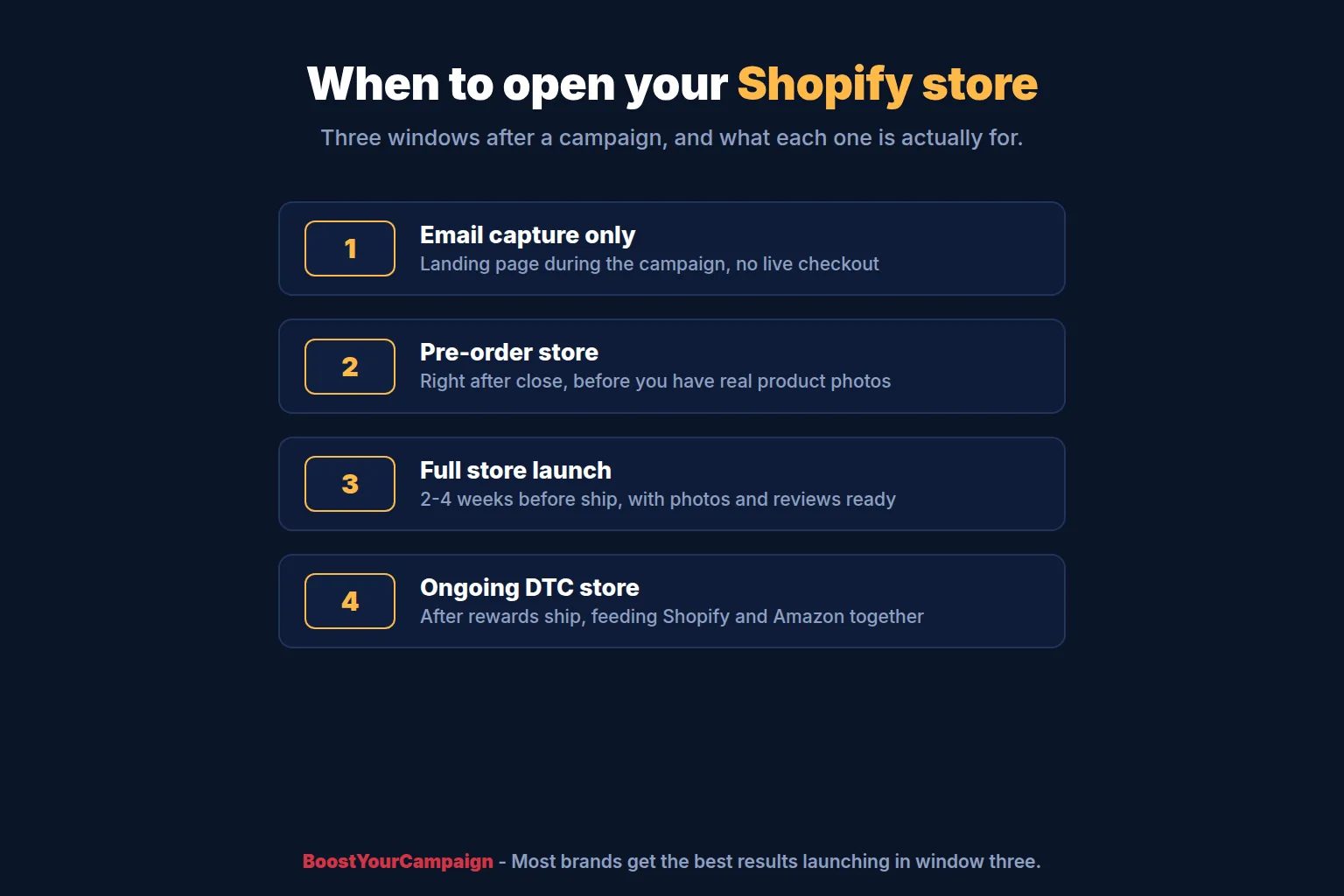
There are three real windows for opening a Shopify store, and each answers a different question. The first is during the live campaign, as an email capture page rather than a live checkout. A simple landing page with a waitlist form, built on the free Shopify plan or even a single page, gives you a place to send traffic that isn't ready to back you on the platform yet, and it starts building the list you'll email once the store goes live for real. Don't sell through it while the campaign is live - you'll split your own conversion data and probably violate the spirit of running one funding channel at a time.
The second window is right after the campaign closes, before rewards ship. This is when most creators are tempted to open the doors, because interest is at its peak. The problem is that you don't have a working example of the product to photograph yet, you don't have reviews, and if manufacturing slips, every new sale becomes a new backer waiting on the same delayed timeline. If you go this route, treat it as a pre-order store, say so clearly, and set expectations to the same ship date your backers already have.
The third and most common window is two to four weeks before rewards ship, once you have final production photos, your first unboxing videos or reviews from an early batch, and a shipping rate you've actually tested. This is the point where BoostYourCampaign typically recommends going live for good, because the store launches with proof instead of promises, and it can absorb backer email traffic and cold ad traffic on the same day. Waiting until rewards have fully shipped loses you the momentum of your warmest weeks - see our deeper breakdown in how to keep selling after crowdfunding for the revenue math on that window.
2) Exporting backer data from Kickstarter and importing it into Shopify
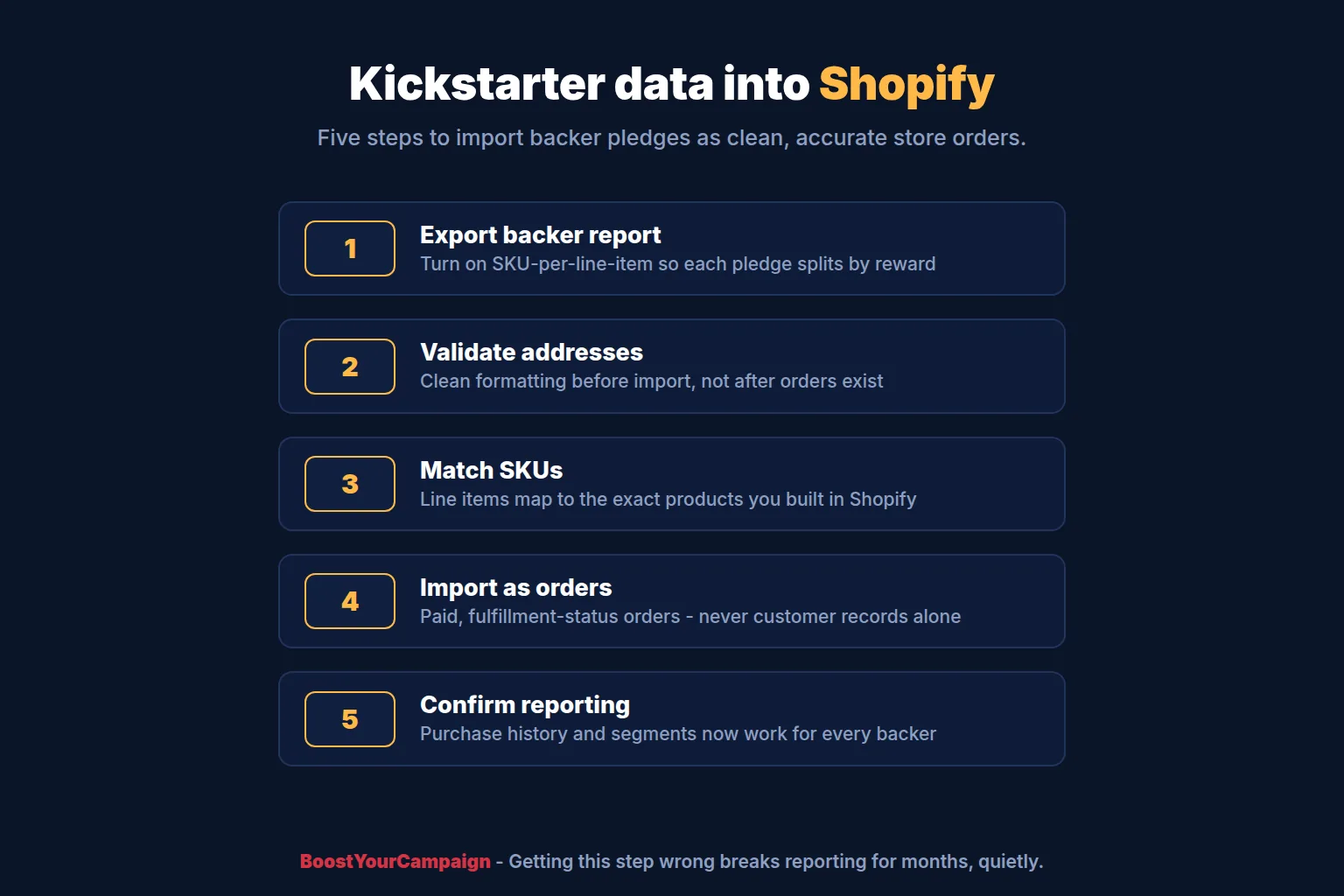
Kickstarter's backer report is the source of truth for who pledged what, but the default export is built for reading, not importing. The setting that matters is the SKU-per-line-item option: turn it on before you export, and the report breaks a single backer's pledge into one row per reward and add-on, each carrying its own SKU. Without it, a backer who pledged for the base unit plus two add-ons shows up as one row with a combined total, and there's no clean way to turn that into accurate line items on a Shopify order.
With SKU-per-line-item turned on, the export maps directly to products and variants you set up in Shopify ahead of time. Match SKU strings exactly - a mismatch of even one character means the import tool can't place that line on the right product, and you'll spend hours reconciling it by hand. Most creators run this through a CSV import app rather than Shopify's native customer/order importer, because the native tool wasn't built to bulk-create paid, fulfilled-status orders from an external payment record.
Import as orders, not customers
This is the single most common setup mistake. Importing backers only as customer records means Shopify has no record of what they bought, which breaks your ability to send order-specific emails, breaks your fulfillment reporting, and gives you no purchase history to build segments from later. Import backers as orders, marked paid outside Shopify and set to the correct fulfillment status, with the reward tier and add-ons as real line items. That gives you a customer record and an order record in one pass, and it means your backers show up correctly in every report you run afterward, including the segment you'll use for the backer welcome email flow in section 6.
Address data needs a cleaning pass before import too. Kickstarter collects shipping addresses through its own survey flow, and international addresses in particular sometimes come through with formatting that Shopify's address validator flags. Run a validation pass before import rather than after - fixing a batch of addresses before orders exist is far faster than fixing them once fulfillment has already tried to pick and pack against a bad address.
3) Pre-orders vs late pledges: they are not the same thing
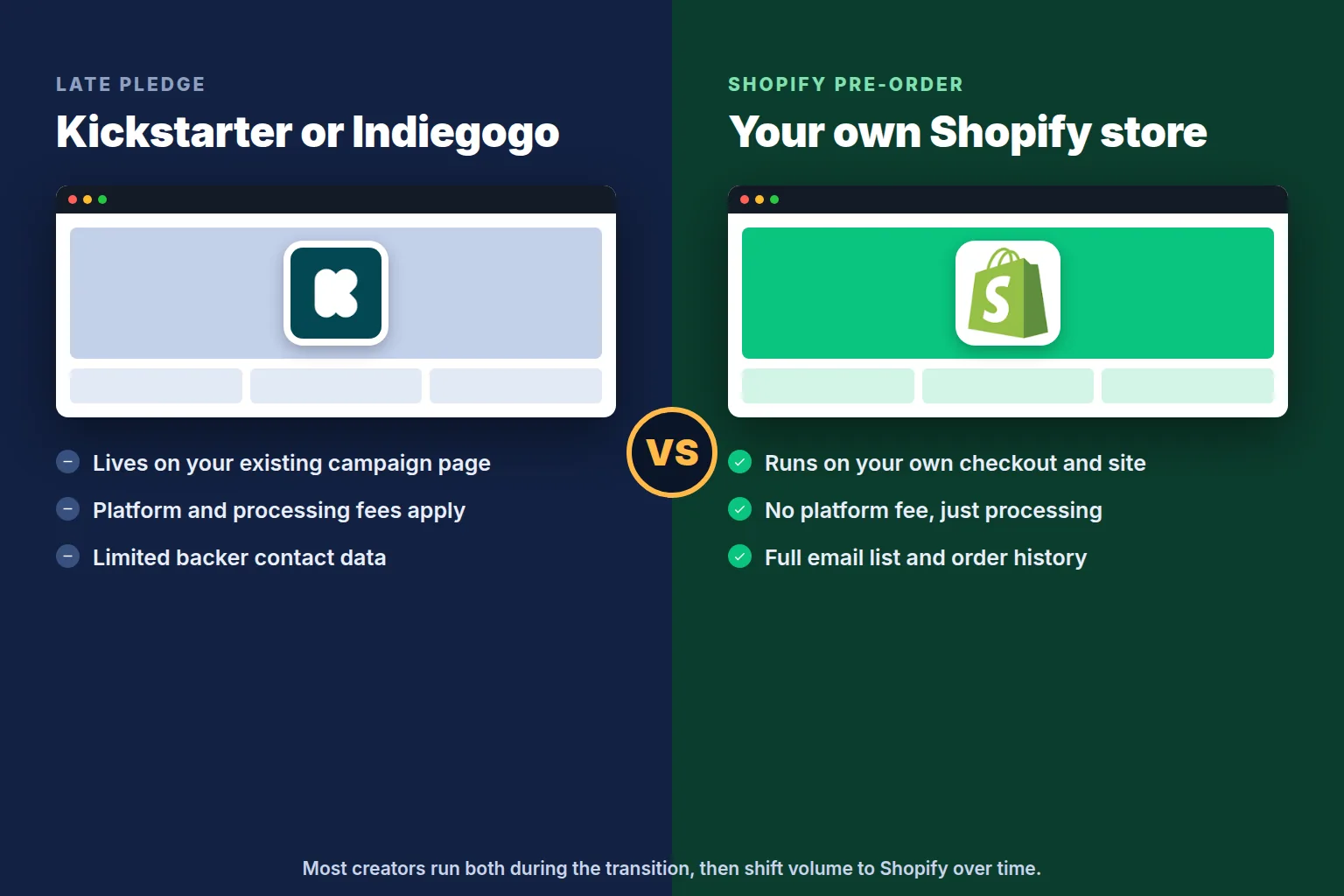
Creators often use "pre-order" and "late pledge" interchangeably, but they run through different systems and carry different costs. A late pledge happens on the platform itself - Kickstarter's late pledge feature, or Indiegogo's Late Pledge (formerly called InDemand) - and it charges platform and processing fees on top of what you already paid to run the campaign. A Shopify pre-order, by contrast, is a normal store order marked with pre-order tags or handled through an app, charged through your own Shopify payment processing, and it puts the buyer straight into your store's customer list and email flows from day one.
The tradeoff is discovery versus ownership. Late pledges keep showing up on your campaign page, which still gets organic traffic and platform search visibility for months after close - that's real, free discovery you don't get on a brand-new Shopify store. Pre-orders on your own site give you the customer relationship, the email address, and none of the platform fee, but only reach people who already know to look for your store. Most campaigns run both for a stretch: late pledges stay open on the platform for continued discovery while the Shopify pre-order store opens in parallel for anyone coming from email or ads. For the full fee comparison and the momentum-window math behind running both, see our companion guide on selling after crowdfunding and our fee breakdown for 2026.
A Shopify pre-order app should hold the charge or delay capture until you have a real ship date, the same way a late pledge does. Charging immediately for a product that's still six weeks from shipping is the fastest way to generate chargebacks and support tickets, and it undermines the trust you spent a whole campaign building.
4) Product and variant setup that mirrors your reward tiers
Your Shopify product structure should map to your reward structure, not the other way around. If your campaign had a base unit, a bundle, and three color options, build one product with a variant for each color and a second product (or a bundle app) for the multi-unit tier, rather than inventing a new catalog structure from scratch. This keeps SKUs consistent with what you already used in fulfillment and in the Kickstarter export, which matters every time you reconcile inventory or run a report that spans both the campaign and the store.
Set inventory tracking on from day one and connect it to whichever warehouse system your fulfillment partner uses. If you're running fulfillment from split US and EU warehouses (see section 7), you'll want Shopify's multi-location inventory turned on so orders route to the nearer warehouse automatically instead of defaulting to whichever location happens to be primary in the admin.
Keep the reward-tier language in your product descriptions during the transition window. Backers landing on your store from a fulfillment email expect to recognize the product they backed, and matching tier names avoids a moment of "wait, is this the same thing I pledged for?" that adds unnecessary support volume.
5) Payments, sales tax, and EU VAT at a high level
Shopify Payments or a third-party processor handles the checkout itself, but tax collection is where first-time store owners lose the most time. In the US, sales tax nexus is established state by state, generally once you cross a revenue or transaction threshold in that state, and Shopify Tax can calculate and collect the right rate automatically once you've registered in the states where you have nexus. Don't assume you're exempt because you're a small brand - nexus thresholds are lower than most creators expect, and a successful campaign can push you over them in some states within weeks.
For the EU, VAT applies to every sale shipped to an EU customer, and the One Stop Shop (OSS) scheme lets you register once and remit VAT for all EU countries through a single return instead of registering separately in each one. This is worth understanding at a high level before you launch, but the mechanics are involved enough that we'd point you to a tax advisor or your fulfillment partner's finance team rather than trying to self-serve it from a blog post. What matters for this guide is that VAT-inclusive pricing and correct customs documentation need to be settled before EU orders start flowing, not after the first customs delay.
6) Shipping profiles for US and EU, and the warehouse split
Shopify shipping profiles let you set different rates and delivery promises by product and by destination, which is exactly what a split US/EU warehouse setup needs. Build one profile for orders shipping from your US warehouse and a separate profile for orders shipping from your EU warehouse, each priced against real carrier rates for that region rather than a single flat global number. A flat rate that averages US and EU shipping costs together quietly overcharges nearby customers and undercharges distant ones, which erodes margin on the far side even when the near side looks fine.
Fulfilling US customers from a US warehouse and EU customers from an EU warehouse turns most international orders into domestic or intra-region ones, which cuts transit time, avoids customs delays, and keeps VAT collection simpler since EU-warehoused stock doesn't trigger an import event on delivery. This is the same principle that matters for backer rewards, and it carries straight through to ongoing store orders once the store is live. Our Kickstarter fulfillment guide and Indiegogo fulfillment guide cover the warehouse split in more depth for the reward-shipping phase specifically.
7) The Kickstarter Spotlight button and linking back to your store
Once your campaign ends, Kickstarter allows funded creators to add a Spotlight page - a lightweight post-campaign page linked from your original campaign that can point visitors to where they can still get the product. Point the Spotlight button straight at your Shopify store once it's live, and keep it pointed at your Kickstarter or Indiegogo late pledge option in the meantime if that's still open. This is free, permanent traffic from a page that keeps ranking and getting organic visits long after the campaign itself is old news, and it costs nothing to set up correctly.
8) Email flows: welcome, pre-order confirmation, shipping updates, and launch to retail
Four email flows do most of the work of turning backers into repeat customers. The backer welcome flow triggers when you import backer orders, thanking them for backing the campaign and introducing the store as the place to track their order or grab an add-on. The pre-order confirmation flow triggers on a new Shopify pre-order, setting expectations on ship date the same way your campaign updates did. The shipping update flow triggers on fulfillment status changes, using the same tracking data your warehouse already generates. The launch-to-retail flow is the one most creators skip: a short sequence, sent once the store has real inventory and reviews, inviting the backer list to buy again, refer a friend, or check out a second product.
Build these once and let them run on autopilot rather than manually emailing each batch. The backer list is the most engaged audience you will have for months, and a flow that runs automatically catches every new order without you remembering to send anything by hand.
9) Retargeting ads from your campaign audience
Every platform you advertised on during the campaign - Meta, Google, TikTok - built an audience of people who engaged with your ads without converting: video viewers, page visitors, add-to-cart abandons if you ran a landing page test. That audience is warmer than any cold audience you'll buy for the store launch, because they've already seen your product story once. Rebuild those custom audiences in your ad accounts before the campaign closes so they're ready to retarget the moment the Shopify store goes live, rather than starting from a blank audience and losing weeks of warm-audience value.
Lookalike audiences built from your actual backer list - not just ad engagers - tend to outperform lookalikes built from page visitors alone, because a backer list is a list of people who already paid, not just people who clicked. If you ran an email capture landing page during the campaign per section 1, that list becomes another lookalike seed worth testing separately.
10) Shopify vs Amazon vs your own site: the trade-offs
Shopify is where you own the customer relationship, the data, and the full margin, and it's the natural first move for anyone coming off a crowdfunding campaign because it plugs directly into the backer list and email flows above. Amazon reaches people who are already searching with intent to buy, but it takes a cut, limits your access to customer data, and rewards listings backed by a fast, reliable delivery promise - which again comes back to having inventory positioned close to the customer. A standalone site outside Shopify's ecosystem gives you the most control but the least built-in tooling, and most creators find the extra engineering overhead isn't worth it compared to a well-built Shopify store.
The trade-off isn't really "pick one." Most successful post-campaign brands run Shopify as the home base and add Amazon once the product has a track record of reviews and repeat purchase, using the same warehouse inventory for both. See our broader post-campaign playbook for how the two channels work together over a longer timeline.
| Channel | Who owns the customer | Fees | Best for |
|---|---|---|---|
| Platform late pledge | The platform - limited backer contact info | Platform and processing fees on every order | Continued discovery from campaign page traffic |
| Shopify pre-order / store | You - full email and purchase history | Shopify plan plus payment processing only | Owning the relationship and repeat purchases |
| Amazon | Amazon - order data only, limited contact | Referral fee plus fulfillment cost if using FBA | High-intent search demand at scale |
| Pledge manager pre-order (BackerKit etc.) | Shared - better contact data than platform alone | Platform fee on the pre-order transaction | Extending the campaign-style pledge experience |
11) Common mistakes we see after a campaign
The most common mistake is opening the store with no inventory plan, taking pre-orders against a manufacturing timeline that then slips, and having no email flow ready to manage the resulting delay. The second is importing backer data as customers instead of orders, which quietly breaks reporting for months before anyone notices. The third is pricing shipping with one flat global rate instead of separate US and EU profiles, which erodes margin on whichever region is farther from your warehouse. The fourth is letting the campaign page and Spotlight button go stale - a dead link back to a store that no longer matches what's on the campaign page confuses exactly the people most likely to buy. The fifth is treating the store launch as a one-time event instead of building the welcome, confirmation, and shipping flows once so they keep working without manual effort.
How BoostYourCampaign fits
BoostYourCampaign builds and runs this whole sequence for creators coming off a campaign: the Shopify store itself, the backer data import mapped correctly to orders, the email flows, and the shipping profiles connected to our own US and EU warehouses. Because we also run campaign marketing and fulfillment under one roof, the store launches already wired to the same inventory that shipped your backer rewards, instead of starting fulfillment over from scratch with a new vendor. See our ecommerce service page for the full scope, or read our fulfillment services overview for how the warehouse side works.
We've been doing this since 2010 across 4,600+ campaigns with $734M+ raised and a 4.9/5 score across 300+ verified reviews, and we're an official Shopify Partner and an Amazon Partner, which means the store setup described in this guide is work we do every week, not a one-off project.
Store launch checklist for a post-crowdfunding Shopify setup
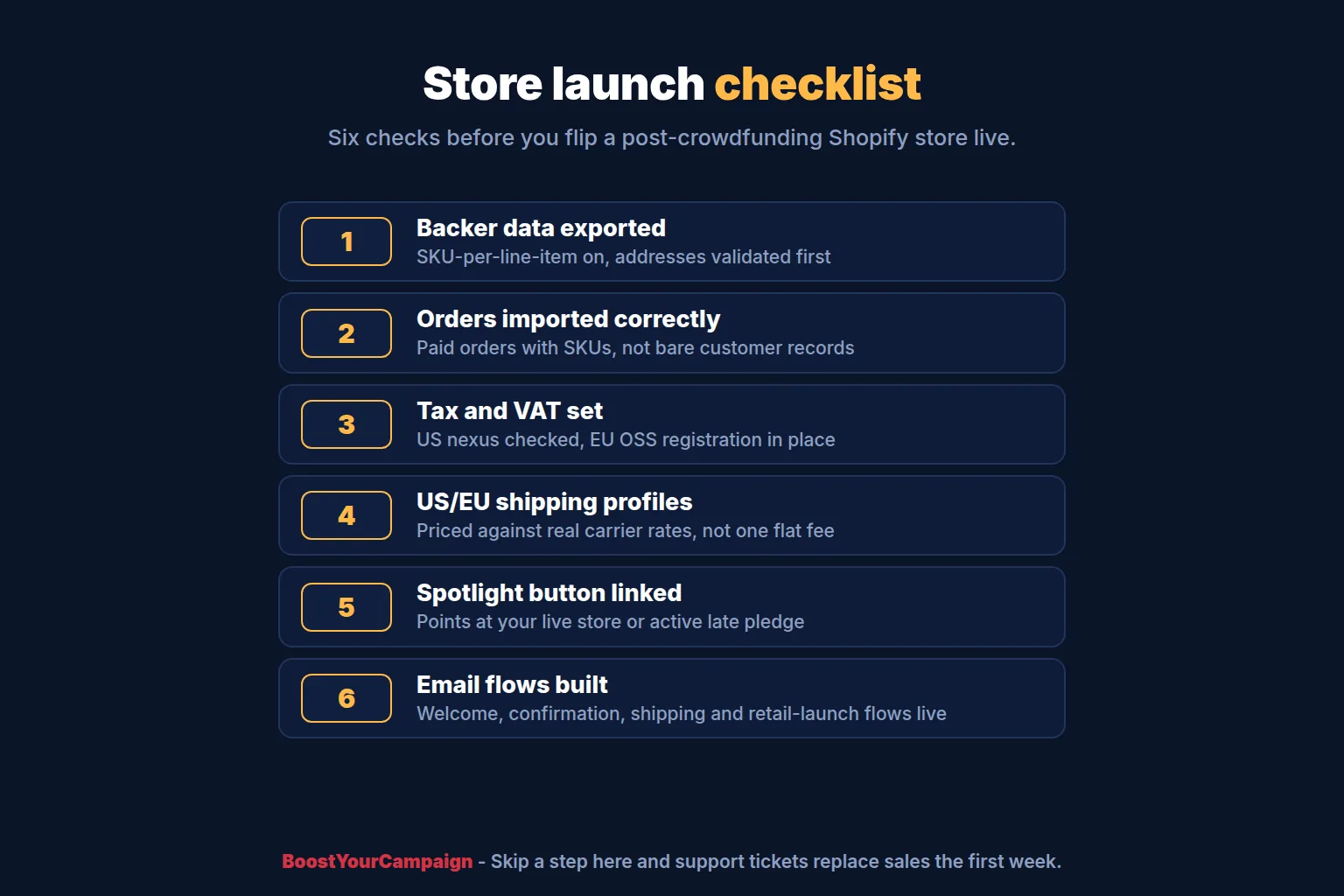
- Kickstarter backer report exported with SKU-per-line-item turned on, addresses validated.
- Backer data imported as paid, fulfillment-status orders - not just customer records.
- Products and variants built to mirror reward tiers and add-ons exactly, with matching SKUs.
- Sales tax nexus checked for US states, VAT/OSS plan set for EU orders.
- Separate US and EU shipping profiles built against real carrier rates, not one flat rate.
- Kickstarter Spotlight button pointed at the live store or the active late pledge page.
- Welcome, pre-order confirmation, shipping update, and launch-to-retail email flows built and live.
- Campaign ad audiences rebuilt for retargeting before the store goes live.
Frequently Asked Questions
When should I open a Shopify store after a Kickstarter campaign?
Most creators get the best results opening the real store two to four weeks before rewards ship, once product photos and shipping rates are final. An email-capture landing page during the campaign is fine, but hold off on live checkout until you have proof - photos, reviews, or an early unboxing - to show new visitors.
How do I import Kickstarter backers into Shopify?
Export the Kickstarter backer report with the SKU-per-line-item option turned on so each pledge splits into accurate line items, then import that data as paid orders with the correct fulfillment status, not as plain customer records. Validate addresses before import rather than after.
What's the difference between a Shopify pre-order and a Kickstarter late pledge?
A late pledge happens on the crowdfunding platform itself and carries the platform's own fee on top of processing. A Shopify pre-order runs through your own store and payment processing, puts the buyer directly into your customer list and email flows, and has no platform fee, but only reaches people who already know to find your store.
Do I need to charge sales tax on my Shopify store after a campaign?
Likely yes in at least some US states, once you cross that state's nexus threshold for revenue or transaction count. A successful campaign can push you over several state thresholds quickly. Shopify Tax can calculate and collect once you've registered in the states where you have nexus.
Should I ship from one warehouse or split between US and EU?
If a meaningful share of your customers are in Europe, splitting inventory between a US and an EU warehouse and building separate Shopify shipping profiles for each cuts transit time, avoids customs delays, and keeps VAT simpler on the EU side. A single-warehouse setup is simpler to run but shifts cost and delay onto whichever region is farther away.
Can I run a Shopify store and a Kickstarter late pledge at the same time?
Yes, and many successful campaigns do exactly that for a stretch after close. The late pledge keeps capturing organic traffic still landing on your campaign page, while the Shopify store captures email and ad traffic and gives you the customer relationship the platform doesn't share.
What's the biggest mistake creators make setting up Shopify after crowdfunding?
Importing backer data as customer records instead of orders. It looks fine at first, then quietly breaks order reporting, purchase history, and segment-based email flows for months before anyone notices the gap.
If you're planning your post-campaign store and want it wired to fulfillment from day one, reach out through /contact.
Want results like these for your campaign?
We've helped 4,600+ creators raise over $734M. Let's pressure-test your launch plan and find the highest-leverage fixes before you go live.
Talk to an expert →Get the free 87-step launch checklist
The exact pre-launch, live-campaign and fulfillment steps we use across 4,600+ launches. Free PDF, emailed instantly.
You're in - check your inbox. Open the checklist now ->